
SD-WAN Fabric Lab
Deploy and operate a complete Cisco SD-WAN fabric across a dual-datacenter controller infrastructure and four branch sites. This course covers controller onboarding, multi-tenant VPN segmentation, centralized policy, hub-and-spoke design, traffic engineering, service chaining, and application-aware routing.
The launch will be soonCourse Highlights
Dual-Datacenter Infrastructure
Deploy and operate a complete Cisco SD-WAN fabric across a dual-datacenter controller infrastructure and multiple branch sites.
Multi-Tenant VPN Segmentation
Create and manage feature templates for Corporate, Servers, and Guest service VPNs with strict route isolation and leaking policies.
WAN Edge Onboarding
Master the onboarding of Managers, Controllers, Validators, and WAN Edge routers across all your branch and DC sites.
Advanced Traffic Engineering
Implement hub-and-spoke topologies, configure OMP preferences, and steer specific traffic through datacenter firewalls (Service Chaining).
Application-Aware Routing
Create advanced policies to track circuit performance and automatically shift application traffic when SLA thresholds are degraded.
Direct Internet Access
Ensure local Guest users can reach the internet directly from the branch router without hair-pinning traffic through the datacenter.
Real-World SD-WAN Experience
Designed for CCIE Enterprise Infrastructure candidates and working network engineers who need real SD-WAN build and troubleshooting experience beyond slides and simulators.
Basic routing knowledge (OSPF/BGP fundamentals) and familiarity with VPNs/VRFs is recommended. No prior Cisco SD-WAN (Viptela) experience is required — the course starts from a blank controller infrastructure.
- Full Controller Stack: Stand up the Enterprise CA, onboard Manager, Controller, and Validator components across two datacenters.
- Multi-Tenancy Handled: Work with Corporate, Servers, and Guest VPNs — each with unique segmentation and route leaking.
- Application SLAs: Build policies that track performance and shift traffic intelligently upon SLA breach.
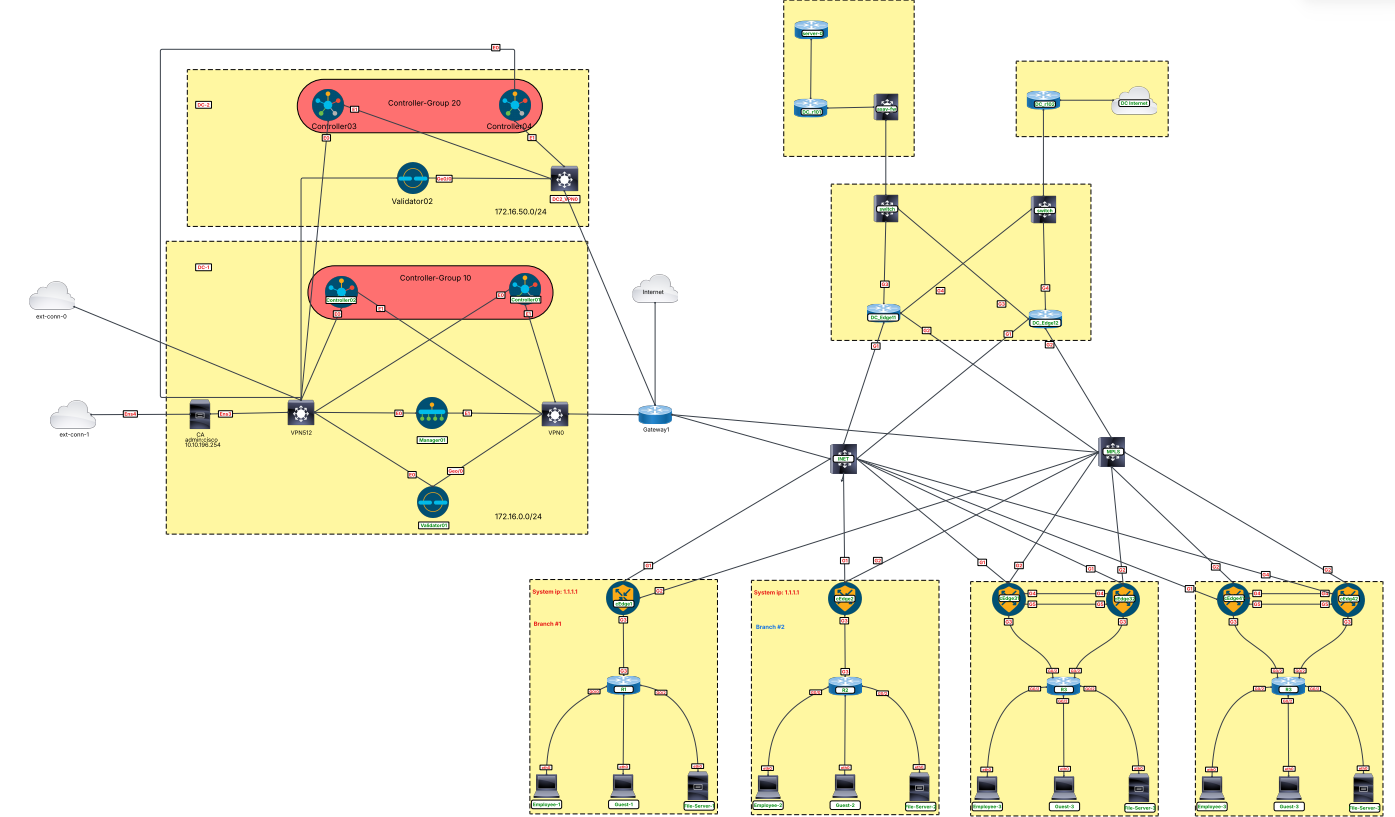
Modules & Topics Overview
- ✓ Multi-Location Controller Infrastructure
- ✓ Enterprise Certificate Authority Setup
- ✓ WAN Edge Device Onboarding
- ✓ Device Templates & Configuration Groups
- ✓ Multi-Tenant Data Plane & VPN Segmentation
- ✓ Symmetrical Inter-VPN Route Leaking
- ✓ Guest User Isolation
- ✓ Hub and Spoke Design & Traffic Engineering
- ✓ Service Chaining (DC Firewalls)
- ✓ Application-Aware Routing & DIA
Modules & Topics
- Set up the Enterprise Certificate Authority
- Onboard DC-1 and DC-2 controllers, Managers, and Validators
- Configure the Manager cluster in DC-1
- Configure Controller Groups 10 and 20
- Review the available WAN Edge onboarding options
- Onboard Sites 1–4 and the DC site
- Create feature templates to manage Sites 1–4
- Create configuration groups to manage the DC site's dual-hub routers
- Create and deploy feature templates for VPN 70 (Corporate), VPN 80 (Servers), and VPN 90 (Guest)
- Configure physical LAN subinterfaces and 802.1Q VLAN tags matching each service VPN on all branch routers
- Implement localized routing (OSPF/BGP) within VPN 70 and VPN 80 to dynamically discover LAN-side user and server subnets
- Verify that routing tables are isolated on the edge devices and that OMP advertisements are distinct
- Use centralized control policy so Corporate VPN and Server VPN can communicate symmetrically
- Create a VPN membership policy so the Guest subnet at one site is not advertised to other sites
- Ensure the Corporate VPN uses a hub-and-spoke topology
- Inject a default route into OSPF from R102 in the DC so the Corporate VPN has internet access
- Enable the On-Demand Tunnel feature for the Corporate VPN
- Verify traceroute behavior for spoke-to-spoke communication
- Prefer DC_Edge11 for Corporate VPN traffic reaching the internet via the DC (OMP preference)
- Build a failover scenario where DC_Edge12 is preferred if DC_Edge11 fails
- Steer Corporate VPN traffic destined to a Server VPN (in the DC or another site) through the DC firewall
- Create a policy to track circuit performance and switch the application path when performance degrades
- Ensure Guest users can reach the internet directly from the local router
Start Your Lab Experience
Lab Hours Booking
Reserve access to a dedicated, pre-wired lab environment and use your purchased lab hours whenever it suits you.
- Direct access via browser and internet connection
- Dedicated Catalyst Center and ISE controllers
- Full control over single fabric site & underlay
- Zero hardware required on your side
- Schedule your lab session for any available date and time